Articles by Mark Pitchford

Mark Pitchford has over 25 years’ experience in software development for engineering applications, the majority of which have involved the extension of existing code bases. He has worked on many significant industrial and commercial projects in development and management, both in the UK and internationally including extended periods in Canada and Australia. Since 2001, he has specialized in software test and works throughout Europe and beyond as a Field Applications Engineer with LDRA.

Unit, Regression and System Testing

Monday, February 20th, 2012 by Mark Pitchford

While unit testing at the time of development is a sound principle to follow, all too often ongoing development compromises the functionality of the software that is already considered complete. Such problems are particularly prevalent when adding functionality to code originally written with no forethought for later enhancements.

Regression testing is what’s needed here. By using a test case file to store a sequence of tests created for the original SOUP (Software of Unproven Pedigree), it is possible to recall and reapply it to the revised code to prove that none of the original functionality has been compromised.

Once configured, this regression testing can be initiated as a background task and run perhaps every evening. Reports highlight any changes to the output generated by earlier test runs. In this way, any code modifications leading to unintentional changes in application behavior can be identified and rectified immediately.

Modern unit test tools come equipped with user-friendly, point-and-click graphical user interfaces. However, when faced with thousands of test cases, a GUI interface is not always the most efficient way to handle the development of test cases. In recognition of this, test tools are designed to allow these test case files to be directly developed from applications such as Microsoft Excel. As before, the “regression test” mechanism can then be used to run the test cases held in these files.

Unit and system test in tandem

Traditionally, many applications have been tested by functional means only. The source code is written in accordance with the specification, and then tested to see if it all works. The problem with this approach is that no matter how carefully the test data is chosen, the percentage of code actually exercised can be very limited.

That issue is compounded by the fact that the procedures tested in this way are only likely to handle data within the range of the current application and test environment. If anything changes a little – perhaps in the way the application is used or perhaps as a result of slight modifications to the code – the application could be running entirely untested execution paths in the field.

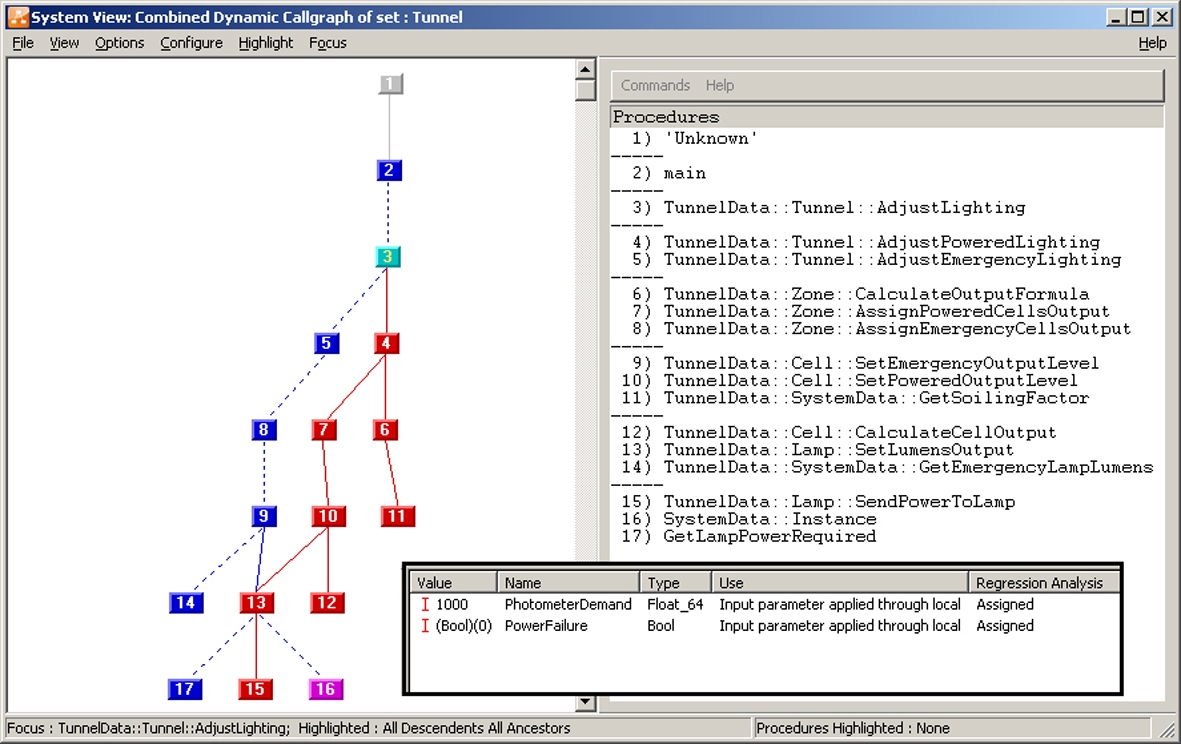
Of course, if all parts of the system are unit tested and collated on a piecemeal basis through integration testing, then this will not happen. But what if timescales and resources do not permit such an exercise? Unit test tools often provide the facility to instrument code. This instrumented code is equipped to “track” execution paths, providing evidence of the parts of the application which have been exercised during execution. Such an approach provides the information to produce data such as that depicted in Figure 1.

Color-coded dynamic flow graphs and call graphs illustrate the parts of the application which have been exercised. In this example, note that the red coloring highlights exercised code.

Code coverage is an important part of the testing process in that it shows the percentage of the code that has been exercised and proven during test. Proof that all of the code has been exercised correctly need not be based on unit tests alone. To that end, some unit tests can be used in combination with system test to provide a required level of execution coverage for a system as a whole.

This means that the system testing of an application can be complemented by unit tests that execute code which would not normally be exercised in the running of the application. Examples include defensive code (e.g., to prevent crashes due to inadvertent division by zero), exception handlers, and interrupt handlers.

Unit test is just one weapon in the developer’s armory. By automatic use of unit test both in isolation and in tandem with other techniques, the development of robust and reliable software doesn’t need to carry the heavy development overhead it once did.

Unit testing: why bother?

Tuesday, October 25th, 2011 by Mark Pitchford

Unit test? Great in theory, but…

Unit test has been around almost as long as software development itself. It just makes sense to take each application building block, build it in isolation, and execute it with test data to make sure that it does just what it should do without any confusing input from the remainder of the application.

Without automation, the sting comes from not being able to simply lift a software unit from its development environment, compile and run it – let alone supply it with test data. For that to happen, you need a harness program acting as a holding mechanism that calls the unit, details any included files, “stubs” written to handle any procedure calls by the unit, and offers any initialization sequences which prepare data structures for the unit under test to act upon. Not only is creating that process laborious, but it takes a lot of skill. More often than not, the harness program requires at least as much testing as the unit under test.

Perhaps more importantly, a fundamental requirement of software testing is to provide an objective, independent view of the software. The very intimate code knowledge required to manually construct a harness compromises the independence of the test process, undermining the legitimacy of the exercise.

Deciding when to unit test

Unit test is not always justifiable and can vary in extent and scope depending on commercial issues such as the cost of failure in the field or the time unit testing will take.

To determine whether to move forward, you need to ask a couple of questions:

  • If unit testing is to take place, how much is involved?
  • Is it best to invest in a test tool, or is it more cost effective to work from first principles?

Developers must make pragmatic choices. Sometimes the choice is easy based on the criticality of the software. If the software fails, what are the implications? Will anyone be killed, as might be the case in aircraft flight control? Will the commercial implications be disproportionately high, as exemplified by a continuous plastics production plant? Or are the costs of recall extremely high, perhaps in a car’s engine controller? In these cases, extensive unit testing is essential and any tools that aid in that purpose make sense. On the other hand, if software is developed purely for internal use or is perhaps a prototype, then the overhead in unit testing all but the most vital of procedures would be prohibitive.

As you might expect, there is a grey area. Suppose the application software controls a mechanical measuring machine where the quantity of the devices sold is low and the area served is localized. The question becomes: Would the occasional failure be more acceptable than the overhead of unit test?

In these circumstances, it’s useful to prioritize the parts of the software which are either critical or complex. If a software error leads to a strangely colored display or a need for an occasional reboot, it may be inconvenient but not justification for unit testing. On the other hand, the unit test of code which generates reports showing whether machined components are within tolerance may be vital.

Beyond unit test

For some people, the terms “unit test” and “module test” are synonymous. For others, the term “unit” implies the testing of a single procedure, whereas “module” suggests a collection of related procedures, perhaps designed to perform some particular purpose within the application.

Using the latter definitions, manually developed module tests are likely to be easier to construct than unit tests, especially if the module represents a functional aspect of the application itself. In this case, most of the calls to procedures are related and the code accesses related data structures, which makes the preparation of the harness code more straightforward.

Test tools render the distinction between unit and module tests redundant. It is entirely possible to test a single procedure in isolation and equally possible to use the exact same processes to test multiple procedures, a file, or multiple files of procedures, a class (where appropriate), or a functional subset of an entire system. As a result, the distinction between unit and module test is one which has become increasingly irrelevant to the extent that the term “unit test” has come to include both concepts.

Such flexibility facilitates progressive integration testing. Procedures are first unit tested and then collated as part of the subsystems, which in turn are brought together to perform system tests. It also provides options when a pragmatic approach is required for less critical applications. A single set of test cases can exercise a specified procedure in isolation, with all of the procedures called as a result of exercising the specified procedure, or anything in between (See Figure 1). Test cases that prove the functionality of the whole call chain are easily constructed. Again, it is easy to “mix and match” the processes depending on the criticality of the code under review.

A single test case (inset) can exercise some or all of the call chain associated with it. In this example, “AdjustLighting,” note that the red coloring highlights exercised code.

This all embracing unit test approach can be extended to multithreaded applications. In a single-threaded application, the execution path is well-defined and sequential, such that no part of the code may be executed concurrently with any other part. In applications with multiple threads, there may be two or more paths executed concurrently, with interaction between the threads a commonplace feature of the system. Unit test in this environment ensures that particular procedures behave in an appropriate manner both internally and in terms of their interaction with other threads.

Sometimes, testing a procedure in isolation is impractical. For instance, if a particular procedure relies on the existence of some ordered data before it can perform its task, then similar data must be in place for any unit test of that procedure to be meaningful.

Just as unit test tools can encompass many different procedures as part of a single test, they can also use a sequence of tests with each one having an effect on the environment for those executed subsequently. For example, unit testing a procedure which accesses a data structure may be achieved by first implementing a test case to call an initialization procedure within the application, and then a second test case to exercise the procedure of interest.

Unit test does not imply testing in only the development environment. Integration between test tools and development environments means that unit testing of software can take place seamlessly using the compiler and target hardware. This is another example of the development judgments required to find an optimal solution – from performing no unit test at all, through to testing all code on the target hardware. The trick is to balance the cost of test against the cost of failure, and the overhead of manual test versus the investment cost in automated tools.